07MESEA · technician training
Proxmox training lab — crisis simulation for technicians
A nested Proxmox environment that mirrors a production cluster: each technician gets their own three-node cluster with a backup server, crisis scenarios are injected, and a trainer tool puts every lab back to a clean state in one command.
- Per trainee3 PVE nodes + PBS
- Referenceproduction, read-only
- Resetgolden snapshot
| Role | Training design, lab architecture, crisis scenarios and trainer tooling |
|---|---|
| Context | MESEA · technician training |
| Stack |
- 01Productionread-only inventory
- 02Training specnetworks · SDN · storage
- 03Nested labs3 PVE + PBS per trainee
- 04Crisis scenariosinjected faults
- 05labctlsnapshot · reset
Why
Maintenance technicians need to practise on a Proxmox cluster that behaves like production — quorum, networks, storage, backups — without any risk to the real one. The aim is to rehearse incidents and recoveries on a faithful copy, as often as needed, and to learn the right reflexes before they are needed on the line.
Production inventory, read-only
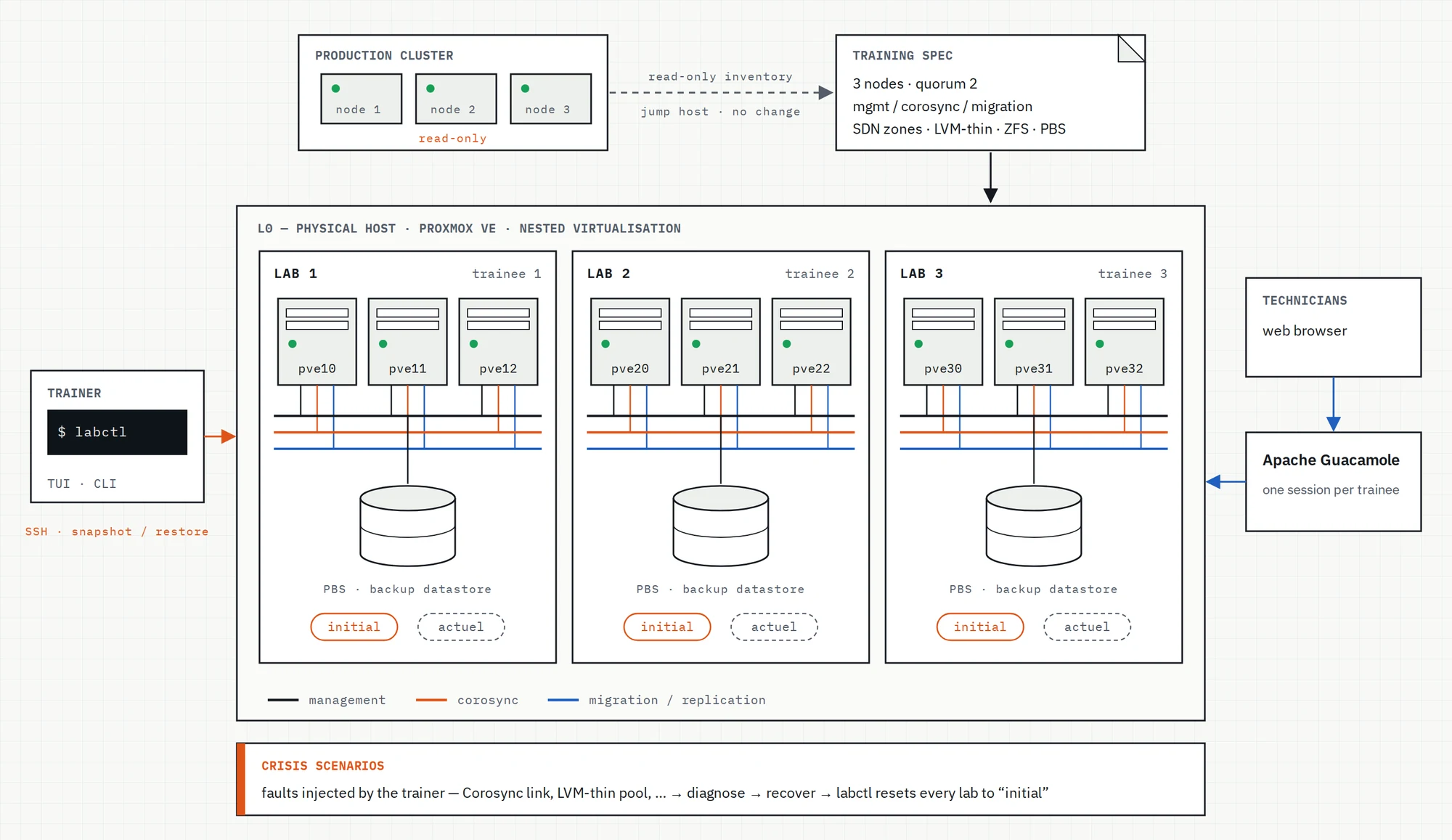
The training spec starts from a read-only inventory of the production cluster, taken through a jump host: no change on production and no password stored. It records what the lab has to reproduce:
- Three nodes with a two-vote quorum, Corosync on a dedicated link with secure authentication.
- Separate management, Corosync and migration / replication networks, with LACP bonds on the compute nodes.
- VLAN-aware bridges carrying several SDN zones and their VNets.
- Local, LVM-thin and ZFS storage, and a Proxmox Backup Server with prune, verify and garbage-collection jobs.
Addresses, host names and network names of the real installation stay out of this page.
Nested lab architecture
One physical host runs a complete, isolated lab per trainee: three virtual Proxmox VE nodes and a virtual Proxmox Backup Server — the production layout, scaled down rather than simplified.
- Three nodes and a quorum of two, with a lighter third node playing the role of the production quorum node.
- Management, Corosync and migration kept on separate networks, even on smaller lab subnets.
- The production SDN zones and their main VNets recreated first; the long tail of VNets comes as a second step.
- Local and LVM-thin storage everywhere, ZFS on two nodes, and a backup datastore modelled on the production one.
- Trainees work from a web browser through Apache Guacamole, one session each.
Crisis scenarios
Each exercise starts from a known, healthy cluster. The trainer then injects a fault — a broken Corosync link, a saturated LVM-thin pool and other realistic failures — and each technician diagnoses and restores the service on their own cluster, as they would during a real incident.
- Freeze a clean reference state of every lab as the “initial” golden snapshot.
- Inject the scenario and let each technician work on their own cluster.
- Save progress as an “actuel” snapshot when a session has to pause.
- Put every lab back to “initial”, in parallel, for the next exercise or the next group.
labctl — the trainer's console
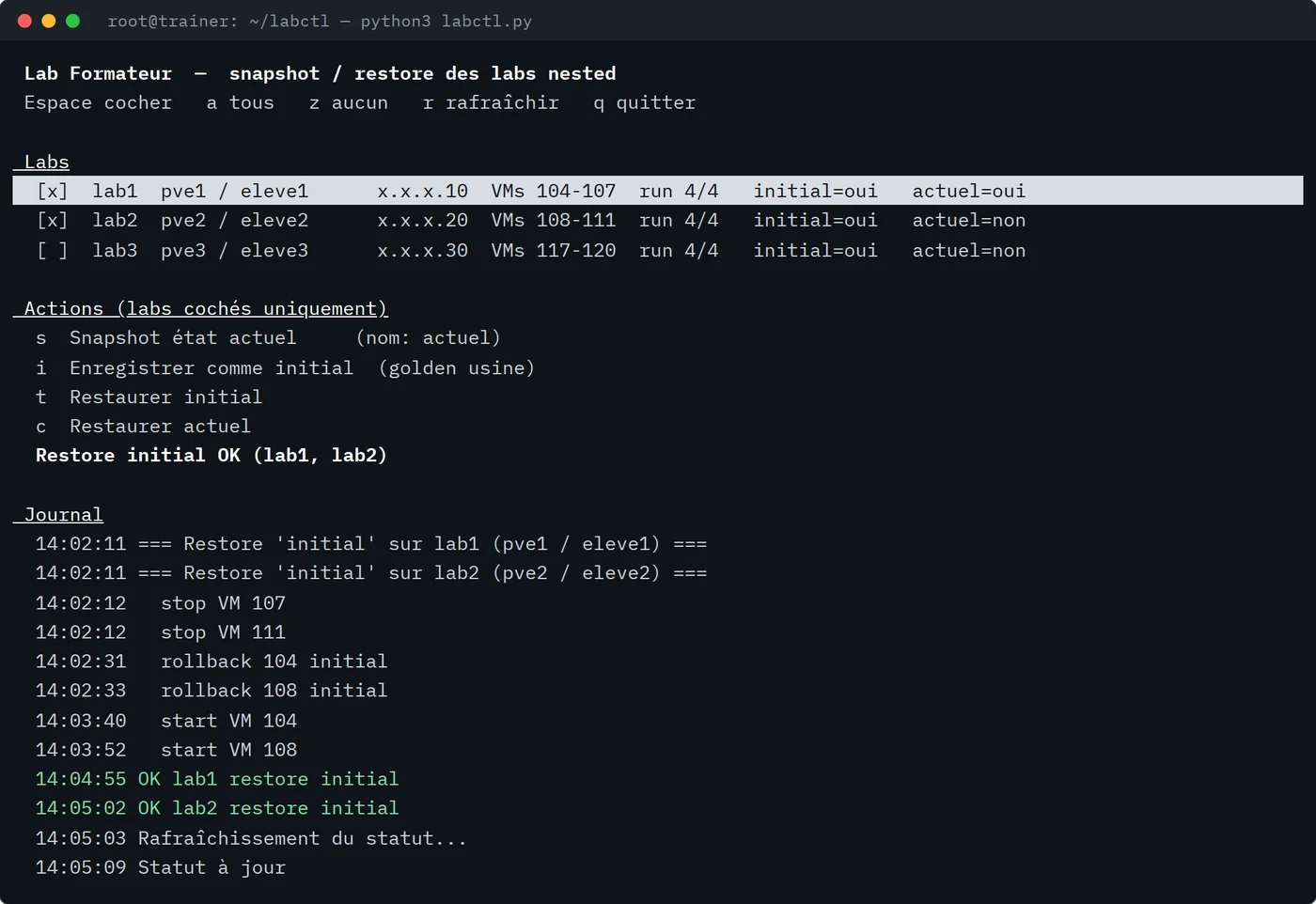
A Python tool written for the trainer, usable as a full-screen terminal interface (curses) or as a command line: status, snapshot, restore.
- Per lab: how many VMs are running, and whether the “initial” and “actuel” snapshots exist.
- Labs are ticked in the interface; actions run on every selected lab in parallel, with a live log.
- Clean ordering: VMs stopped in reverse order (backup server first), snapshotted or rolled back, then restarted in boot order.
- A confirmation before every action, and a second one before overwriting an existing snapshot.
- Key-only SSH in batch mode; everything goes through the standard qm and pvesh commands.
Result
Technicians can break and repair a production-like cluster as often as needed, and the trainer gets every lab back to a clean state with a single command — without ever touching production.